

A total of 3459 characters, expected to take 9 minutes to complete reading.
ESP32S3 Firmware Burn Address
When we used the PlatformIO Upload to automatically upload the firmware, we actually uploaded the following four files, each with the following address:
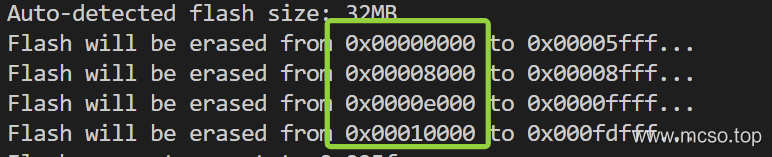
where the address is 0x0 of bootloader.bin Documentation (Bootstrap);0x8000 of partitions.bin file (partition file);0x10000 is our application file. firmware.bin file. The last 0xe000 The file itself can be uploaded without uploading. It is used to distinguish OTA partitions. Please refer ESP32S3 Official Documentation-Bootload ESP32S3 Official Documents-OTA Partitions .
And the above files all exist under the project folder. .pio\build\env (env is your environment name) inside, we can use these files as firmware to upload, but it is very troublesome, because there are four (or only three) files:
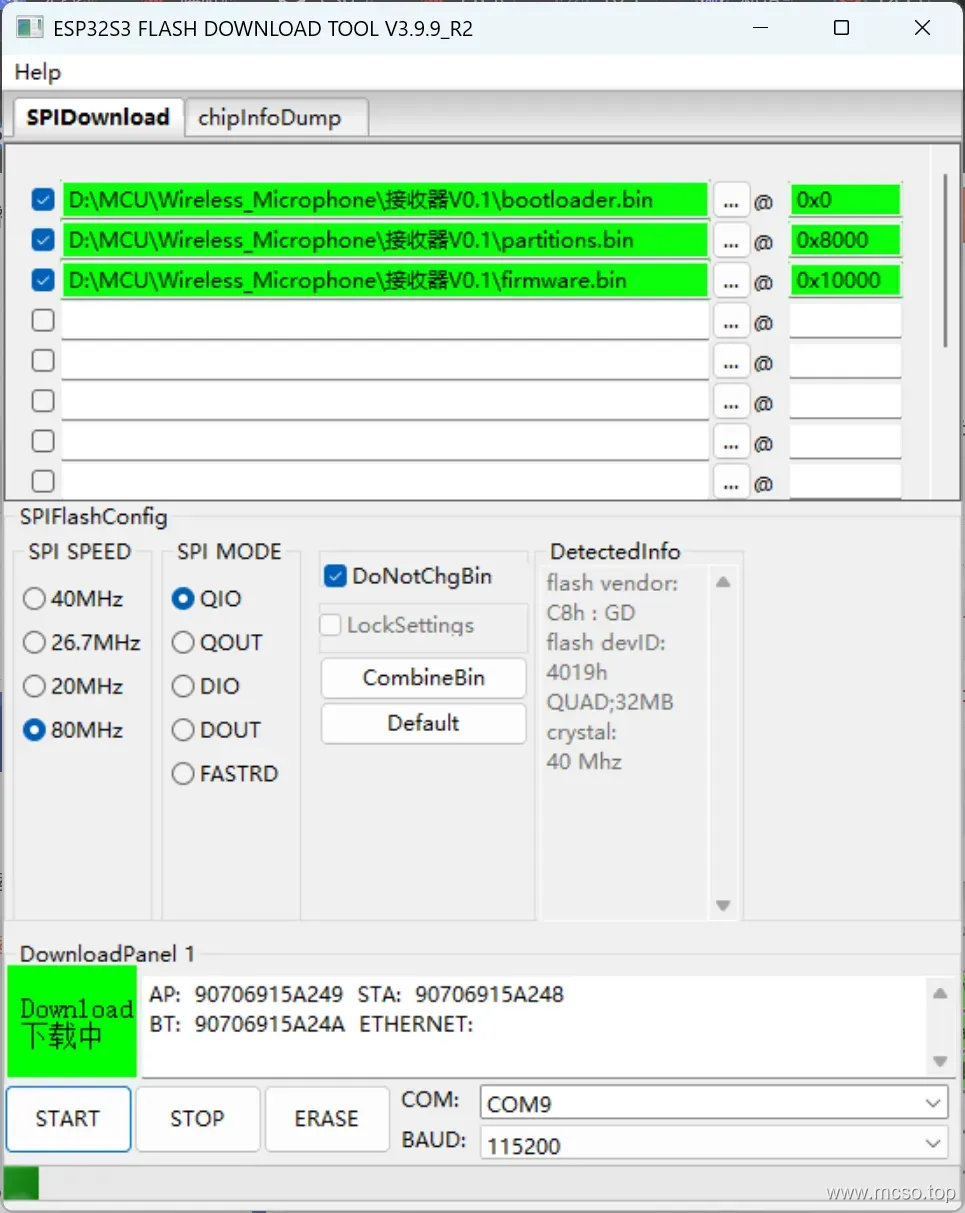
(And every time the compilation is completed, you have to look in these folders.)
Is there a simple way? Yes, yes, look down.
Merge multiple BIN files
The official ESPTool provided by ESP32 merge-bin command, which is used to merge multiple partition files and eventually become full firmware, so that it is only used in 0x0 Just burn a BIN file at the address. The official introduction is as follows, Point me .
In other words, we only need to use the command. esptool --chip ESP32-S3 merge-bin -o merged-flash.bin 0x0 bootloader.bin 0x8000 partitions.bin 0x10000 firmware.bin You can put three different documents together and become merged-flash.bin.
However, it is too troublesome to execute this command every time, and it is impossible to run this command directly under PlatformIO.
PlatformIO to execute custom commands
The main meaning is, in platformio.ini File added:
[env:pre_and_post_hooks]
extra_scripts = post:extra_script.py
and create extra_script.py File:
Import("env")

print("Current CLI targets", COMMAND_LINE_TARGETS)
print("Current Build targets", BUILD_TARGETS)

def post_program_action(source, target, env):
    print("Program has been built!")
    program_path = target[0].get_abspath()
    print("Program path", program_path)
    # Use case: sign a firmware, do any manipulations with ELF, etc
    # env.Execute(f"sign --elf {program_path}")

env.AddPostAction("$PROGPATH", post_program_action)

#
# Upload actions
#

def before_upload(source, target, env):
    print("before_upload")
    # do some actions

    # call Node.JS or other script
    env.Execute("node --version")

def after_upload(source, target, env):
    print("after_upload")
    # do some actions

env.AddPreAction("upload", before_upload)
env.AddPostAction("upload", after_upload)

#
# Custom actions when building program/firmware
#

env.AddPreAction("buildprog", callback...)
env.AddPostAction("buildprog", callback...)

#
# Custom actions for specific files/objects
#

env.AddPreAction("$PROGPATH", callback...)
env.AddPreAction("$BUILD_DIR/${PROGNAME}.elf", [callback1, callback2,...])
env.AddPostAction("$BUILD_DIR/${PROGNAME}.hex", callback...)

# custom action before building SPIFFS image. For example, compress HTML, etc.
env.AddPreAction("$BUILD_DIR/spiffs.bin", callback...)

# custom action for project's main.cpp
env.AddPostAction("$BUILD_DIR/src/main.cpp.o", callback...)

# Custom HEX from ELF
env.AddPostAction("$BUILD_DIR/${PROGNAME}.elf",
    env.VerboseAction(" ".join([
        "$OBJCOPY", "-O", "ihex", "-R", ".eeprom",
        "$BUILD_DIR/${PROGNAME}.elf", "$BUILD_DIR/${PROGNAME}.hex"
    ]), "Building $BUILD_DIR/${PROGNAME}.hex")
)
You can run custom python scripts, and of course you can run the ones we just mentioned. merge-bin Order.
that is to say,env.AddPostAction("$BUILD_DIR/${PROGNAME}.bin", callback...) be able to generate firmware.bin After execution callback... function.
PlatformIO Automatic Full Firmware Generation Method
Under the project folder platformio.ini The PIO profile of is added (which can be found in [env] or [env:xxx] Add below):
extra_scripts = post:build/build_script.py Among them build/build_script.py corresponds to the extra script file we want to execute.
According to the configuration just now, we create it under the project folder. build directory and create the following script that automatically merges the firmware build/build_script.py (This corresponds to the configuration just now):
Import("env")
import os

OUTPUT_DIR = f"build{os.path.sep}firmware.bin"

def merge_bins(source, target, env):
  # source 为 ELF 文件路径
  # target 为 BIN 文件路径

  # 获取除了 APP_BIN 之外的其他需要烧录的 bin 文件列表
  flash_images = env.Flatten(env.get("FLASH_EXTRA_IMAGES", []))
  # 添加主程序 bin 文件及其偏移地址
  flash_images += [env.get("ESP32_APP_OFFSET"),
    f"$BUILD_DIR{os.path.sep}${{PROGNAME}}.bin",
  ]

  # 执行合并 bin 文件命令
  cmd = " ".join(
    [
      "$PYTHONEXE",
      "$OBJCOPY",
      "--chip",
      env.get("BOARD_MCU"),
      "merge-bin",
      "--output",
      f"$PROJECT_DIR{os.path.sep}{OUTPUT_DIR}",
      # "--flash-mode",
      # env.get("BOARD_FLASH_MODE"),
      # "--flash-size",
      # flash_size,
      # "--flash-freq",
      # str(int(env.get("BOARD_F_FLASH").replace("L", "")) // 1000000) + "m",
    ]
    + flash_images
  )
  env.Execute(cmd)

env.AddPostAction(f"$BUILD_DIR{os.path.sep}${{PROGNAME}}.bin", [merge_bins])
in the code. OUTPUT_DIR Indicates the path of the merged output file, which can be modified. There are comments in the other content code, which should be well understood.
At this time, execute build After, in build/firmware.bin You can see our full firmware:


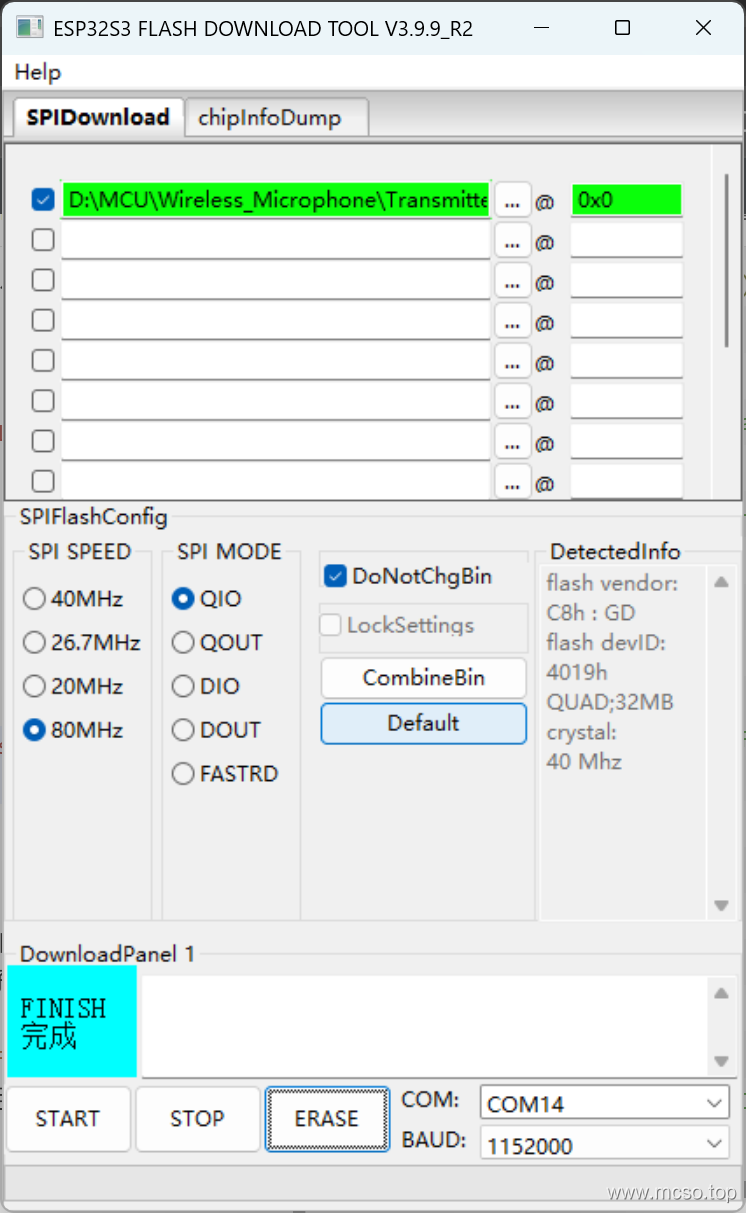
At this time, we only need to burn one file to burn, that is, burn 0x0:


 English
  简体中文
简体中文